Automating Terminal Tool Setup
Published: February 2, 2025
This article explores using Ansible to automate Linux terminal environment setup across multiple workstations. Rather than manually configuring each machine, I created an Infrastructure as Code solution to quickly replicate a customized development environment.
GitHub Repository
The complete playbook is hosted in the Homelab GitHub Repository. Clone the repository and navigate to the linuxWorkstationSetup directory to get started.
Dependency Management
The setup uses Poetry for Python package management. Execute the following commands to prepare dependencies:
poetry install
poetry shell
Playbook Execution
Run the playbook with:
ansible-playbook -i localhost, -e user=brad -e home_dir=/home/brad setup_terminal_tools.yaml -K
The username and home directory must be passed as environment variables.
Core Configuration Tasks
RSync Setup
Enables passwordless sudo for rsync operations, allowing efficient file synchronization.
Python Dependencies
Installs python3-libdnf5 for package management compatibility.
NeoVim Installation
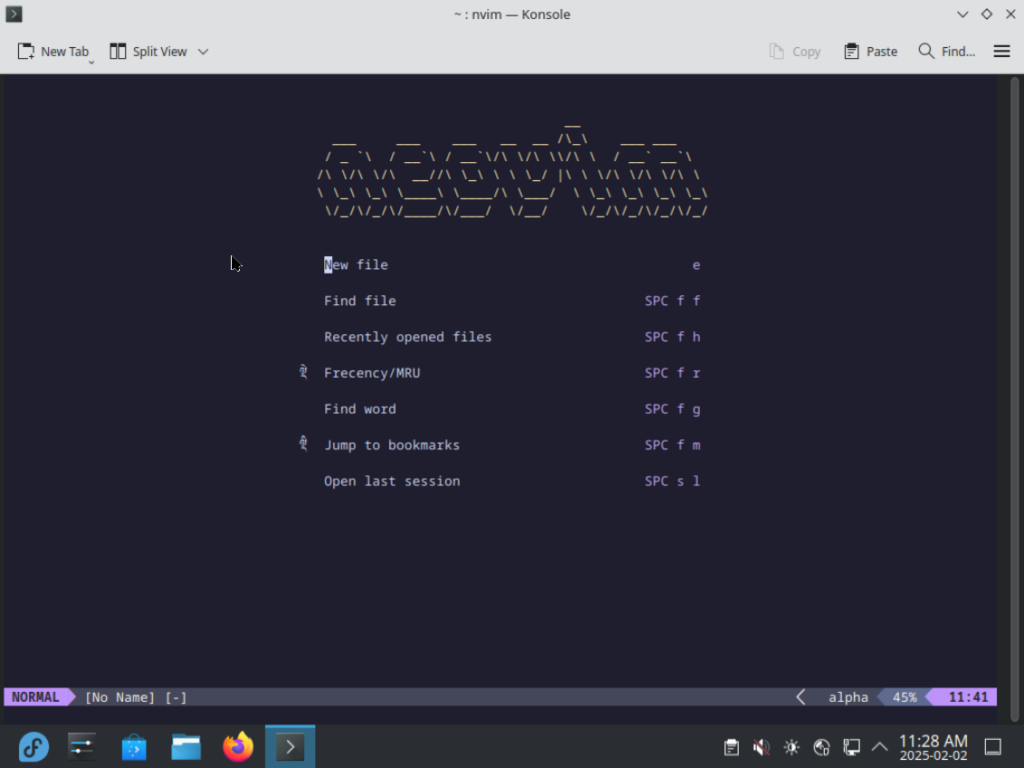
Installs NeoVim with custom configuration from TypeCraft's tutorials, includes ripgrep for fast searching.
Shell Configuration
Installs and configures ZSH with Oh-My-ZSH and PowerLevel10k theme. Note: Initial setup requires some manual configuration for the theme.
Version Control Tools
Installs Git and GitHub CLI for development workflows.
Target Audience
This setup is designed for developers and system administrators managing multiple Linux workstations who want reproducible environment configurations.